IBM Cloud
Mount an IBM Cloud Object Storage bucket as a Windows drive.
Before you begin
Prepare the following in advance:
- A Cloud Object Storage instance with at least one bucket. If you have no instance or no bucket, first follow Create an instance and a bucket.
- HMAC credentials for that instance — an IAM API key alone does not work with the S3 interface.
Where to get the keys — in the IBM Cloud console:
- Click the Expand Global Navigation icon (☰) in the upper-left corner.
- Click Infrastructure → Storage → Object storage.
- In the left menu, expand Instances and click the name of your instance.
- Click the Service credentials tab.
- Click New Credential.
- In Name, enter a name for the credential.
- In Role, choose a role. To write files to the drive, choose Writer. To only read files, choose Reader. If you keep the default None, no bucket access is granted.
- Turn on Include HMAC Credential.
- Click Add.
- In the list, click the arrow to the left of the new credential to expand it.
- Under
cos_hmac_keys, copyaccess_key_idandsecret_access_key.

In RaiDrive, enter access_key_id in Access Key ID and
secret_access_key in Secret Access Key.
Help from IBM
Connect
- Click Add in the toolbar.
- Choose Enterprise → IBM Cloud.
- Enter the Access Key ID and Secret Access Key, then click the Refresh button next to the bucket field.
- Select the bucket and click Connect.
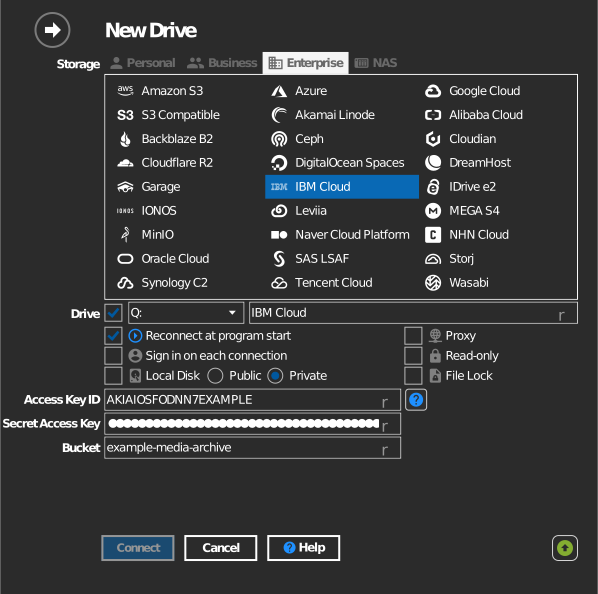
Manual bucket entry
If your key is not allowed to list buckets, tick the checkbox to the left of the bucket field and type the bucket name directly.
Settings
| Setting | Description | Default |
|---|---|---|
| Access Key ID / Secret Access Key | HMAC credential of the COS instance | — |
| Bucket | The bucket to mount (list or manual entry) | — |
| Read-only | Blocks writes to the mounted drive | off |
Behavior & limits
- Buckets are listed together with their location — regional endpoints
follow
s3.<region>.cloud-object-storage.appdomain.cloud(us-south, us-east, eu-de, eu-gb, au-syd, …). - An API key alone is not enough for the S3 interface — it must be the HMAC key pair.
Create an instance and a bucket
Follow these steps only if you have no Cloud Object Storage instance or no bucket. If you already have both, go straight to the keys in Before you begin.
Create an instance
- Click the Expand Global Navigation icon (☰) in the upper-left corner.
- Click Infrastructure → Storage → Object storage.
- Click Create an instance. The create page opens in a new tab.
- In Select a pricing plan, choose a plan.
- Under Configure your resource, enter a name for the instance in Service name.
- Under Summary on the right, click Create. The new instance opens.
Create a bucket
- On the instance page, click the Buckets tab.
- Click Create bucket.
- On the Create a Custom Bucket card, click Create.
- In Unique bucket name, enter a name for the bucket. You can also keep the name that is filled in for you.
- Choose the Resiliency, Location, and Storage class. You cannot change these three after the bucket is created.
- Click Create bucket.
Troubleshooting
| Symptom | Cause | Fix |
|---|---|---|
| Authentication fails | Service credential created without HMAC | Re-create the credential with Include HMAC Credential on |
| Bucket missing from the list | Bucket belongs to another COS instance | Use the credential of the instance that owns the bucket |