Storage
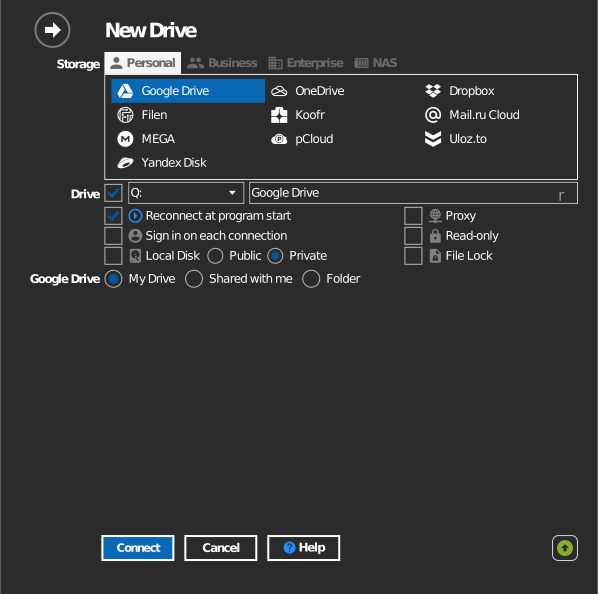
RaiDrive groups storage services into four categories — the same grouping you see in the app's Add dialog.
| Category | For | Storage services |
|---|---|---|
| Personal | Individual cloud accounts | Dropbox, Filen, Google Drive, Koofr, Mail.ru Cloud, MEGA, OneDrive, pCloud, UlozTo, Yandex Disk (currently unavailable: Google Photos, Naver MYBOX) |
| Business | Organization accounts | Box, DirectCloud, Dropbox, Google Workspace, OneDrive, OneDrive China, OpenDrive, SharePoint, SharePoint China, SugarSync |
| Enterprise | Object storage | Akamai Linode, Alibaba Cloud, Amazon S3, Azure, Backblaze B2, Ceph, Cloudflare R2, Cloudian, DigitalOcean Spaces, DreamHost, Garage, Google Cloud, IBM Cloud, IDrive e2, IONOS, Leviia, MEGA S4, MinIO, Naver Cloud Platform, NHN Cloud, Oracle Cloud, S3 Compatible, SAS LSAF, Storj, Synology C2, Tencent Cloud, Wasabi |
| NAS | NAS devices and self-hosted servers | WebDAV, SFTP, FTP, ASUSTOR, ipTIME, Nextcloud, QNAP, Synology |
Every service mounts the same way: files stream on demand — nothing is synced to local disk, and there is no duplicate local copy.
Every guide follows the same layout: Before you begin → Connect → Settings → Behavior & limits → Troubleshooting.
To use files on a drive with AI tools such as Claude, ChatGPT or Gemini, see Use cloud storage and NAS files with AI tools.