MEGA S4
Mount a MEGA S4 Object Storage bucket as a Windows drive.
Before you begin
Prepare the following in advance:
- An S4 Access Key ID and Secret Access Key pair.
Where to get the keys — in the S4 console (mega.nz):
- Click Object storage in the left panel.
- Click Keys in the left panel.
- Click Create key.
- Enter a name for the key.
- Choose whether the key is for the root user or a sub-user. For a sub-user, also choose the existing user to add the key to.
- Copy the Access key and Secret key. You can also click Download to save them to a credentials file.
In RaiDrive, enter the Access key in Access Key ID and the Secret key in Secret Access Key.
Help from MEGA
Connect
- Click Add in the toolbar.
- Choose Enterprise → MEGA S4.
- In Endpoint, choose the city closest to you. The endpoint is the MEGA S4 server that the drive connects to.
- Enter the Access Key ID and Secret Access Key, then click the Refresh button next to the bucket field.
- Select the bucket and click Connect.
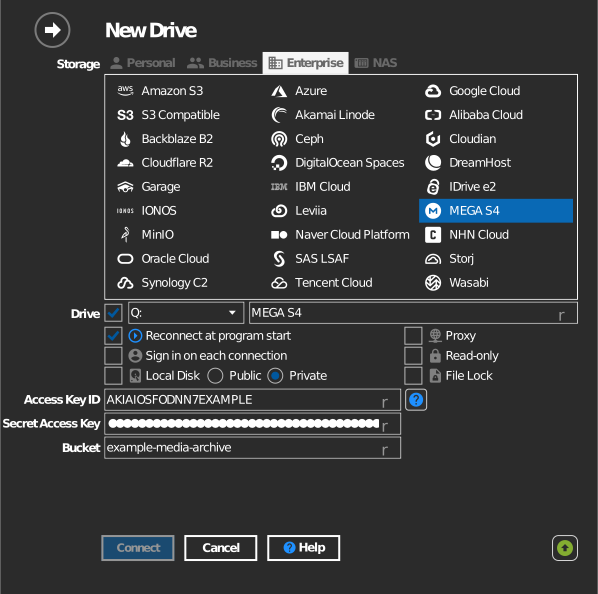
Manual bucket entry
If your key is not allowed to list buckets, tick the checkbox to the left of the bucket field and type the bucket name directly.
Settings
| Setting | Description | Default |
|---|---|---|
| Endpoint | The MEGA S4 server the drive connects to. Each item shows the city and the server address | Amsterdam (s3.eu-amsterdam-1.megas4.com) |
| Access Key ID / Secret Access Key | S4 credentials | — |
| Bucket | The bucket to mount (list or manual entry) | — |
| Read-only | Blocks writes to the mounted drive | off |
Behavior & limits
- The drive talks to the endpoint you choose (
s3.<region>.megas4.com). Each endpoint is a regional cache, so the closest one is usually the fastest. - Buckets are not tied to a region, so any endpoint reaches any bucket. You can change the endpoint later in the drive properties and keep the same bucket.
- The ? button next to Endpoint opens MEGA S4 endpoint URLs, MEGA's list of current endpoints.
- A drive that uses an old MEGA S4 address (
s4.mega.io) moves to the endpoint in the same city. RaiDrive saves the new address the next time you connect the drive.
Troubleshooting
| Symptom | Cause | Fix |
|---|---|---|
| Bucket list empty | Key restricted | Type the bucket name manually |
| Access Denied | Key lacks bucket permission | Check the key's policy in the S4 console |