WebDAV
Mount any WebDAV server as a Windows drive — a NAS, Nextcloud, or any other server that speaks WebDAV over HTTP or HTTPS.
Before you begin
Prepare the following in advance:
- The WebDAV service must be enabled on the server:
- Synology — WebDAV Server package
- QNAP
- ASUSTOR
- Nextcloud — WebDAV is always on; the URL is
https://<host>/remote.php/dav/files/<username>/
- The server address (hostname or IP) and port. For access from outside your network, a DDNS hostname is the usual approach — Synology, QNAP, and ASUSTOR each offer a built-in DDNS service.
- A user account on the server, unless the server allows anonymous access.
Help from Synology
Help from QNAP
Help from ASUSTOR
Connect
- Click Add in the toolbar.
- Choose NAS → WebDAV.
- Select https (recommended) or http, and enter the server address and port.
- Optionally enter a path to mount a subfolder as the drive root.
- Enter the username and password, or tick Anonymous.
- For https, pick the TLS/SSL version matching your server's setting, choose a timeout if needed, and click Connect.
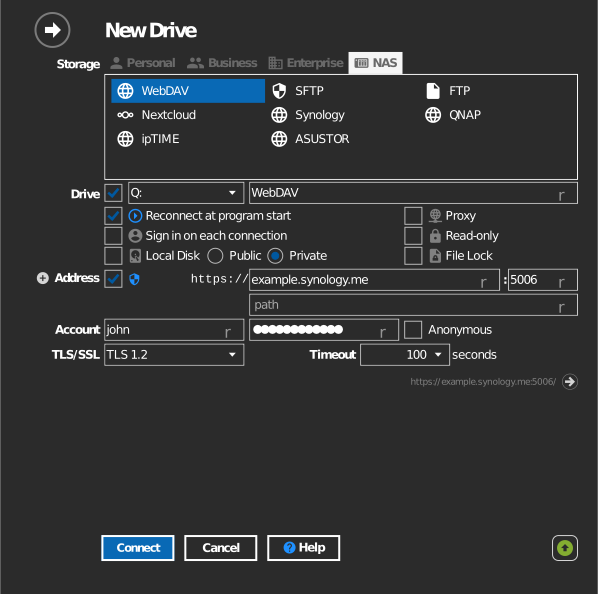
Settings
| Setting | Description | Default |
|---|---|---|
| Protocol | https or http | https |
| Address / Port | Server host and WebDAV port (Synology default: 5006 https) | — |
| Path | Server folder mounted as the drive root | server root |
| Anonymous | Connect without credentials | off |
| TLS/SSL | TLS version used for https | auto |
| Timeout | Seconds to wait for a server response | — |
| Read-only | Blocks writes to the mounted drive | off |
Alternate address
Click the + next to Address to add a second line for a backup server address. The path stays the same as the primary address. If RaiDrive cannot connect with the primary address, it tries the alternate address automatically.
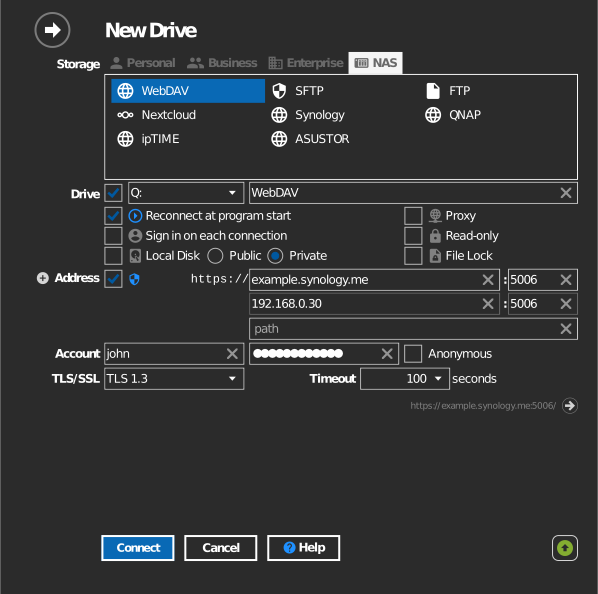
Behavior & limits
- Performance depends heavily on the server's WebDAV implementation; NAS devices are typically slower over WebDAV than over SFTP.
- If the server's TLS compatibility level is set to modern, old TLS versions are rejected — match the TLS/SSL setting to the server.
- Keeping the original Date modified when copying works on most WebDAV servers (Synology, QNAP, TerraMaster, Zyxel, Nextcloud) but not on all — ipTIME and ASUSTOR do not support it.
Troubleshooting
| Symptom | Cause | Fix |
|---|---|---|
| Connection refused | WebDAV service not enabled, or wrong port | Enable the service; check http vs https port |
| TLS handshake fails | TLS version mismatch with server policy | Pick the TLS/SSL version the server accepts |
| Works on LAN, fails outside | Router/firewall not forwarding the port | Forward the WebDAV port; use a DDNS hostname |
| Slow directory listing | Deep folders over a slow server | Raise the timeout; consider SFTP if the NAS supports it |
| Large uploads fail with error 413 | The WebDAV server limits request size | Raise the upload/body-size limit on the server (NAS or reverse proxy) — see forum thread |
| A saved document appears as 0 bytes | Bug in builds before 2023.9.119 (fixed since) | Update RaiDrive to the current version |