ASUSTOR
Mount an ASUSTOR NAS as a Windows drive over WebDAV. Enable WebDAV on the NAS, and use ASUSTOR DDNS to reach it from outside your network.
Before you begin
Prepare the following in advance:
- Enable WebDAV on the NAS.
- For access from outside your network, enable ASUSTOR DDNS
(ADM → Settings → Manual Connect → DDNS,
<name>.myasustor.com).
Help from ASUSTOR
Connect
- Click Add in the toolbar.
- Choose NAS → ASUSTOR.
- Select https, enter the server address (DDNS hostname or IP) and the WebDAV port, then your ADM username and password.
- Pick the TLS/SSL version if needed, and click Connect.
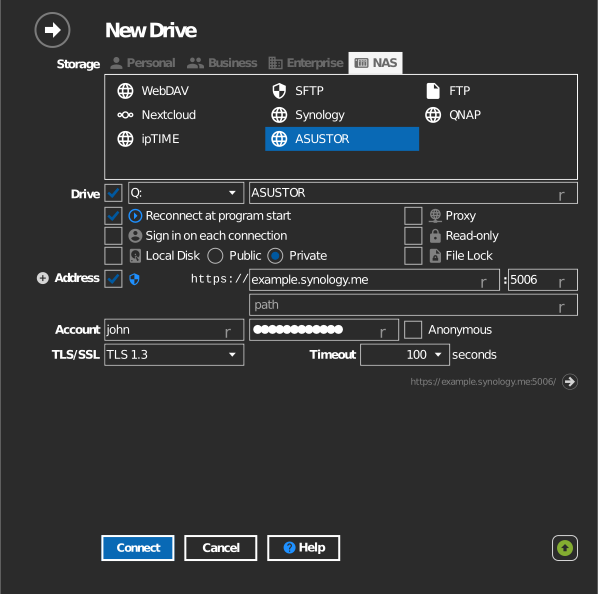
Settings
| Setting | Description | Default |
|---|---|---|
| Protocol | https or http | https |
| Address / Port | NAS host and WebDAV port | — |
| Path | Shared folder mounted as the drive root | all shares |
| TLS/SSL | TLS version used for https | auto |
| Read-only | Blocks writes to the mounted drive | off |
Behavior & limits
- ADM shared-folder permissions are enforced on the drive.
- ASUSTOR's WebDAV server does not support keeping the original Date modified when copying — the drive setting Maintain "Date modified" of files and folders has no effect here.
Troubleshooting
| Symptom | Cause | Fix |
|---|---|---|
| Connection refused | WebDAV not enabled, or wrong port | Enable WebDAV in ADM; confirm its port |
| Works on LAN only | Router not forwarding the port | Forward the WebDAV port; use the DDNS hostname |