Yandex Disk
Mount Yandex Disk as a Windows drive. Sign in with your Yandex account, or with the Google or X (Twitter) account linked to it.
Before you begin
Prepare the following in advance:
- A Yandex account. You can also sign in with the Google or X (Twitter) account linked to it.
Help from Yandex
Connect
- Click Add in the toolbar.
- Choose Personal → Yandex Disk.
- Set the drive letter and name, then click Connect.
- Your browser opens — sign in to Yandex and allow access.
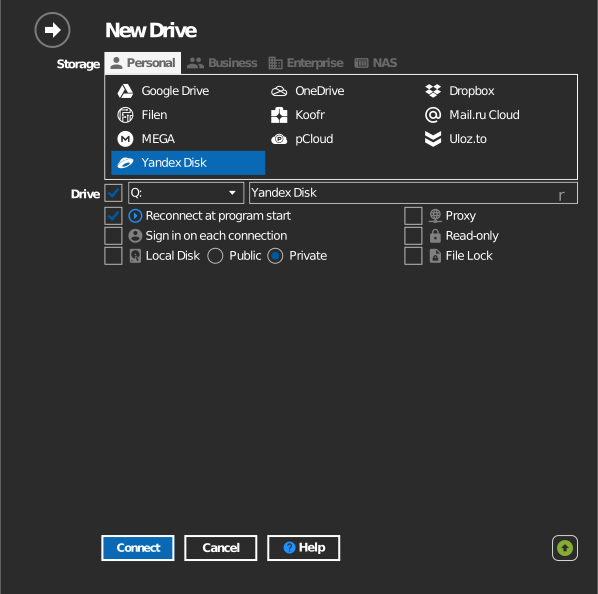
Settings
| Setting | Description | Default |
|---|---|---|
| Drive letter | Where the drive mounts in Windows | first available |
| Name | Label shown in File Explorer | Yandex Disk |
| Read-only | Blocks writes to the mounted drive | off |
Behavior & limits
- Transfer speed and storage quota follow your Yandex Disk plan.
Troubleshooting
| Symptom | Cause | Fix |
|---|---|---|
| Sign-in loops | Account requires 2-step verification | Complete verification in the browser, then connect again |