Nextcloud
Mount a Nextcloud server as a Windows drive over WebDAV.
Before you begin
Prepare the following in advance:
- Your Nextcloud server address and account. WebDAV is always enabled on
Nextcloud — no server configuration is needed. The connection works the
same whether your Nextcloud is hosted or self-installed; only where the
address comes from differs:
- Hosted Nextcloud (a provider or Simple Signup account) — the server address is in your sign-up email or provider portal; TLS is already set up for you.
- Self-hosted — use your own server address; for access from outside your network you need a valid TLS certificate and DDNS / port forwarding.
- If your account uses 2-factor authentication, create an app password (Settings → Security) and use that instead of your login password.
Help from Nextcloud
Connect
- Click Add in the toolbar.
- Choose NAS → Nextcloud.
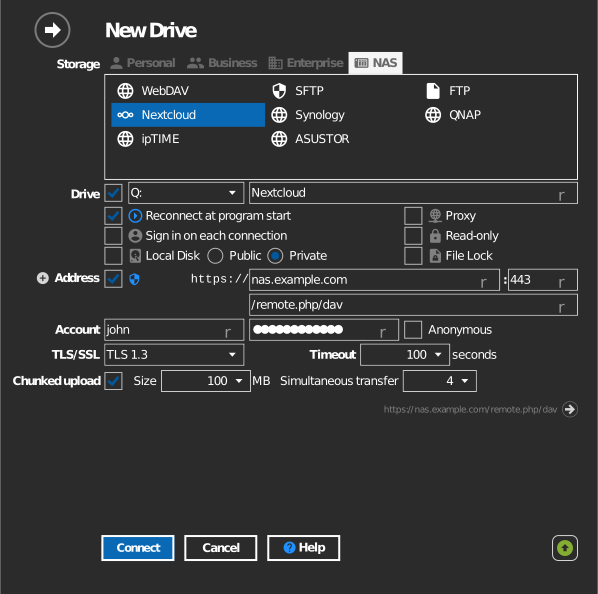
- Select https, enter the server address, and enter your username and password (or app password).
- Click Connect.
Settings
| Setting | Description | Default |
|---|---|---|
| Protocol | https or http | https |
| Address / Port | Nextcloud server host | — |
| Path | Server folder mounted as the drive root | your files |
| TLS/SSL | TLS version used for https | auto |
| Chunked upload | Splits uploads into parts (5MB-5GB each, with adjustable parallel transfers) — helps with large files or unstable connections | off |
| Read-only | Blocks writes to the mounted drive | off |
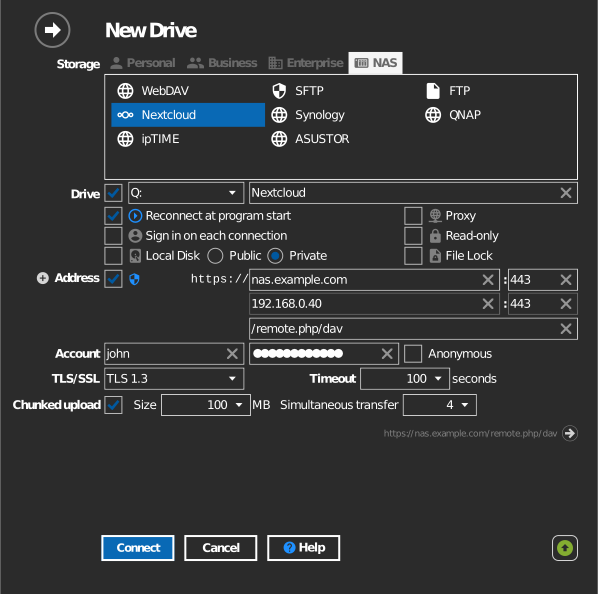
Alternate address
Click the + next to Address to add a second line for a backup server address. The path stays the same as the primary address. If RaiDrive cannot connect with the primary address, it tries the alternate address automatically.
Behavior & limits
- Shares and group folders appear exactly as they do in the Nextcloud web UI, with their permissions enforced.
- Server-side encryption or external-storage backends can make some operations slower than plain folders.
Troubleshooting
| Symptom | Cause | Fix |
|---|---|---|
| Sign-in fails with 2FA enabled | Login password used | Create and use an app password |
| Connection fails behind a proxy | Reverse proxy blocks WebDAV verbs | Allow PROPFIND/MKCOL/MOVE/COPY in the proxy config |