OneDrive (Business)
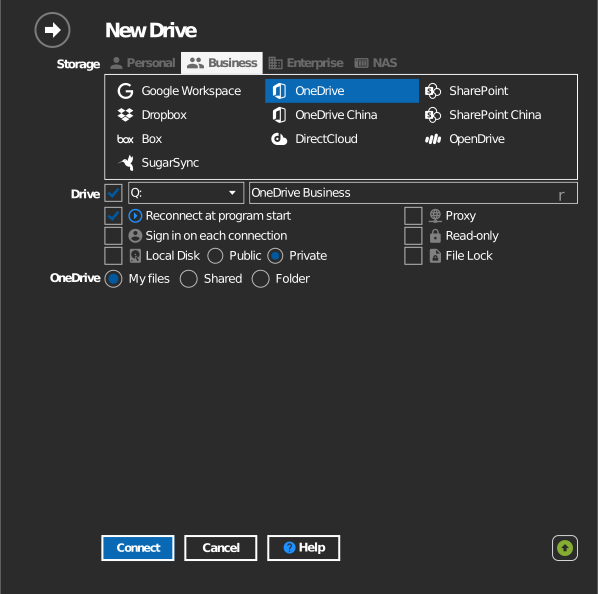
Mount the OneDrive that comes with a Microsoft 365 work or school account as a Windows drive. In RaiDrive this is the OneDrive entry in the Business tab.
Before you begin
Prepare the following in advance:
- A Microsoft 365 work or school account.
- Your organization must allow third-party app consent — if consent is blocked, ask your Microsoft 365 administrator to approve RaiDrive.
For tenants hosted on the Chinese sovereign cloud (21Vianet), use the separate OneDrive China entry.
Help from Microsoft
Connect
- Click Add in the toolbar.
- Choose Business → OneDrive.
- Pick what to mount:
- My files — your whole work OneDrive.
- Shared — items shared with you inside the organization.
- Folder — a single folder, or one by its URL (see Mount a specific folder below).
- Set the drive letter and name, then click Connect. Your browser opens — sign in with your work account and click Accept.
Mount a specific folder
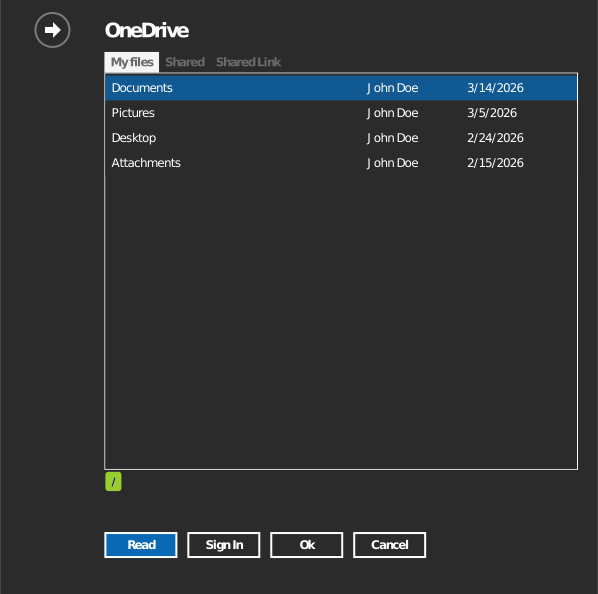
Instead of the whole OneDrive, you can mount the selected folder.

Specify the folder one of two ways:
- Click the folder icon to open a folder browser — it asks you to sign in first, then double-click into the folder you want and click OK.
- Or select the Shared Link tab and paste the URL directly. Open the folder in OneDrive on the web and copy the URL from your browser's address bar.
Settings
| Setting | Description | Default |
|---|---|---|
| Drive letter | Where the drive mounts in Windows | first available |
| Name | Label shown in File Explorer | OneDrive |
| Source | My files, Shared, or a specific folder / Shared Link | My files |
| Read-only | Blocks writes to the mounted drive | off |
Behavior & limits
- File and folder permissions are enforced by Microsoft 365 — what you cannot do in the web UI, you cannot do on the drive either.
- OneDrive rejects file names containing
" * : < > ? / \ |— see Microsoft's restrictions list. - Heavy parallel transfers can be slowed by Microsoft Graph API throttling.
Troubleshooting
| Symptom | Cause | Fix |
|---|---|---|
| "Need admin approval" during sign-in | Tenant blocks unapproved apps | Ask your administrator to grant consent to RaiDrive |
| Sign-in works but connection fails | Account is on a 21Vianet tenant | Use the OneDrive China entry instead of the global one |
| A shared item is missing | Shared to a different account or group | Confirm the sharing target in the OneDrive web UI |