Tencent Cloud
Mount a Tencent Cloud COS (Cloud Object Storage) bucket as a Windows drive.
Before you begin
Prepare the following in advance:
- A SecretId and SecretKey: the SecretId is the access key and the SecretKey is the secret key.
Where to get the keys — on the CAM API Keys page of the console:
- Click Create Key (Tencent recommends doing this as a sub-user rather than the root account).
- Copy both values.
Help from Tencent Cloud
Connect
- Click Add in the toolbar.
- Choose Enterprise → Tencent Cloud.
- Enter your SecretId as Access Key ID and your SecretKey as Secret Access Key, then click the Refresh button next to the bucket field.
- Select the bucket and click Connect.
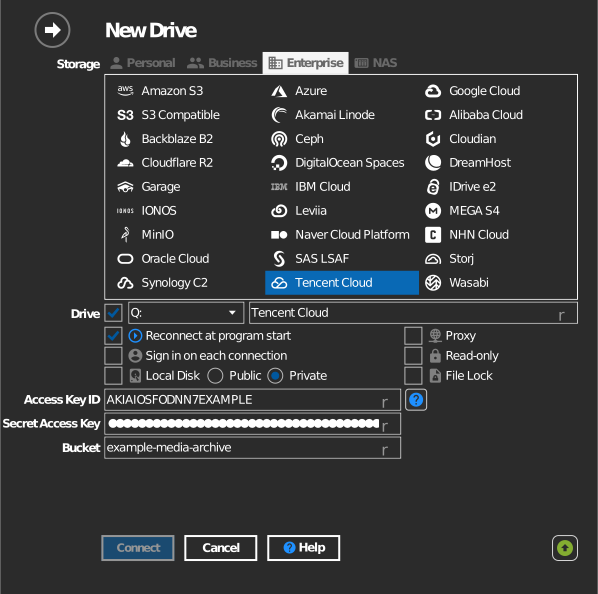
Manual bucket entry
If your key is not allowed to list buckets, tick the checkbox to the left of the bucket field and type the bucket name directly.
Settings
| Setting | Description | Default |
|---|---|---|
| Access Key ID / Secret Access Key | CAM SecretId / SecretKey pair | — |
| Bucket | The bucket to mount (list or manual entry) | — |
| Read-only | Blocks writes to the mounted drive | off |
Behavior & limits
- Each COS region lists only its own buckets, so RaiDrive scans all regions
(
cos.<region>.myqcloud.com— Chinese mainland, Hong Kong, Singapore, Seoul, Tokyo, US, EU, and the FSI regions) — the first listing can take a few seconds. - COS bucket names carry the APPID suffix (e.g.
mybucket-1250000000); RaiDrive shows them as the console does — see Tencent Cloud: bucket naming conventions.
Troubleshooting
| Symptom | Cause | Fix |
|---|---|---|
| Bucket list empty | Sub-account lacks COS read permission | Grant COS access in CAM, or type the bucket manually |
| Access Denied on connect | Bucket policy blocks the key | Check the bucket's permission settings in the console |