S3 Compatible
Any service that implements the S3 API can be mounted as a Windows drive. The connection fields are always the same — endpoint URL, Access Key ID, Secret Access Key, and a bucket — so this one guide covers the whole S3 family.
Many of these services appear as their own named entry in RaiDrive's Enterprise tab (Amazon S3, Cloudflare R2, Wasabi, Backblaze B2, …). Pick the named entry when it exists — RaiDrive then knows the endpoint pattern and region list for you. Use the generic S3 Compatible entry for anything else, including self-hosted servers.
Before you begin
Prepare the following in advance:
- An Access Key ID and Secret Access Key issued by the service — every S3-compatible service has a key-management page in its own console; the dedicated provider pages in this section tell you exactly where for each named service.
- The service's S3 endpoint URL (see the table below).
- Some services need one extra identifier — for example Cloudflare R2 needs your Account ID and Oracle needs your object storage namespace.
Connect
- Click Add in the toolbar.
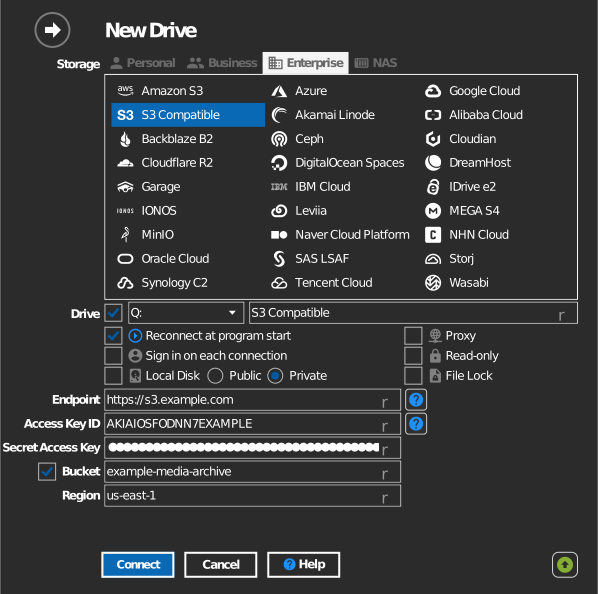
- Choose Enterprise → the named service, or S3 Compatible if it is not listed.
- For the generic entry, type the endpoint URL (and, if the service requires it, the region).
- Enter the Access Key ID and Secret Access Key, then click the Refresh button next to the bucket field.
- Select the bucket and click Connect.
Manual bucket entry
If your key is not allowed to list buckets, tick the checkbox to the left of the bucket field and type the bucket name directly.
Endpoint reference
| Service | Endpoint pattern | Regions |
|---|---|---|
| Akamai Linode | https://<region>.linodeobjects.com |
Use URLs for access |
| Alibaba Cloud | https://oss-<region>.aliyuncs.com |
Regions and endpoints |
| Amazon S3 | https://s3.<region>.amazonaws.com |
Amazon Simple Storage Service endpoints and quotas |
| Backblaze B2 | https://s3.<region>.backblazeb2.com |
Where are the Backblaze Cloud Storage Data Centers |
| Ceph (self-hosted) | your RADOS Gateway URL | — |
| Cloudflare R2 | https://<account-id>.r2.cloudflarestorage.com |
Data location |
| Cloudian (self-hosted) | your server URL | — |
| DigitalOcean Spaces | https://<region>.digitaloceanspaces.com |
Spaces Availability |
| DreamHost | https://objects-us-east-1.dream.io or https://s3.us-east-005.dream.io (per cluster) |
What DreamObjects hostname should I use to connect? |
| Garage (self-hosted) | your server URL | — |
| IBM Cloud | https://s3.<region>.cloud-object-storage.appdomain.cloud |
Endpoints and storage locations |
| IDrive e2 | https://<host>.<region>.idrivee2-XX.com (shown in your e2 console) |
Region endpoints |
| IONOS | https://s3.<region>.ionoscloud.com |
Endpoints |
| Leviia | https://s3.<region>.leviia.com |
— |
| MEGA S4 | https://s3.<region>.megas4.com |
MEGA S4 endpoint URLs |
| MinIO (self-hosted) | your server URL | — |
| Naver Cloud Platform | https://<region>.object.ncloudstorage.com — region: kr, us, sg, de; jp: https://jp.object.ncpstorage.com |
Object Storage overview |
| Oracle Cloud | https://<namespace>.compat.objectstorage.<region>.oraclecloud.com |
Regions and Availability Domains |
| Storj | https://gateway.storjshare.io (single global endpoint) |
Storj-hosted S3 Compatible Gateway |
| Synology C2 | https://<region>.s3.synologyc2.net |
How to use development tools with C2 Object Storage |
| Tencent Cloud | https://cos.<region>.myqcloud.com |
Regions and Access Endpoints |
| Wasabi | https://s3.<region>.wasabisys.com |
Service URLs for Wasabi's Storage Regions |
| Scaleway and others | https://s3.<region>.scw.cloud — via the generic S3 Compatible entry |
Object Storage - Concepts |
Settings
| Setting | Description | Default |
|---|---|---|
| Endpoint | The service's S3 API URL | — |
| Region | Authentication region; required by some services (e.g. Garage, Scaleway) | empty |
| Access Key ID / Secret Access Key | Credentials issued by the service | — |
| Bucket | The bucket to mount (list or manual entry) | — |
| Read-only | Blocks writes to the mounted drive | off |
Behavior & limits
- RaiDrive validates the endpoint for self-identifying servers: MinIO, Cloudian, Ceph, and Garage are recognized by their server responses; IDrive e2, Akamai Linode, and Synology C2 by their hostname pattern. A mismatched endpoint is rejected with "invalid endpoint".
- Self-hosted servers (MinIO, Cloudian, Ceph, Garage) are accessed path-style, and private/self-signed TLS certificates are accepted.
- S3 semantics apply everywhere: no real folders — "folders" are key prefixes — see AWS: organizing objects using folders.
Troubleshooting
| Symptom | Cause | Fix |
|---|---|---|
| "invalid endpoint" | Endpoint does not match the selected service | Check the pattern in the table, or use the generic S3 Compatible entry |
| Bucket list empty | Key cannot list buckets | Use manual bucket entry |
| Signature / authorization errors | Service needs an explicit region | Fill the Region field with the value from your service console |
| TLS errors on a LAN server | Self-signed certificate on a named public service entry | Use the self-hosted entries (MinIO/Cloudian/Ceph/Garage) or S3 Compatible |