Alibaba Cloud
Mount an Alibaba Cloud OSS (Object Storage Service) bucket as a Windows drive.
Before you begin
Prepare the following in advance:
- An AccessKey ID and AccessKey Secret with permission to list and read/write the target bucket.
Where to get the keys — in RAM AccessKey Management:
- Create a RAM user (recommended over the root account).
- Attach an OSS policy (e.g.
AliyunOSSFullAccessor a scoped custom policy). - Click Create AccessKey.
- Copy both values.
Help from Alibaba Cloud
Connect
- Click Add in the toolbar.
- Choose Enterprise → Alibaba Cloud.
- Enter the AccessKey ID as Access Key ID and the AccessKey Secret as Secret Access Key, then click the Refresh button next to the bucket field.
- Select the bucket and click Connect.
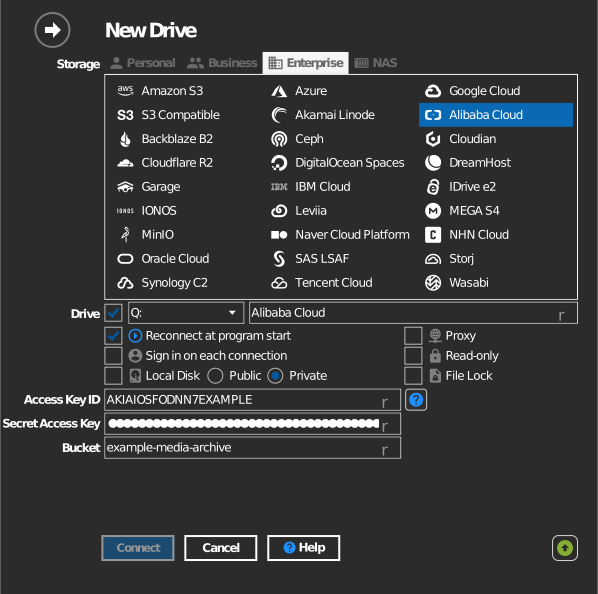
Manual bucket entry
If your key is not allowed to list buckets, tick the checkbox to the left of the bucket field and type the bucket name directly.
Settings
| Setting | Description | Default |
|---|---|---|
| Access Key ID / Secret Access Key | RAM or account credentials (Alibaba's AccessKey ID/Secret) | — |
| Bucket | The bucket to mount (list or manual entry) | — |
| Read-only | Blocks writes to the mounted drive | off |
Behavior & limits
- Buckets are discovered across OSS regions
(
oss-<region>.aliyuncs.com— mainland China, Hong Kong, APAC, EU, US, Middle East).
Troubleshooting
| Symptom | Cause | Fix |
|---|---|---|
| Bucket list empty | RAM user lacks oss:ListBuckets |
Extend the RAM policy, or type the bucket manually |
| Access Denied on connect | Key lacks bucket permission | Check the bucket ACL/policy in the OSS console |