Amazon S3
Mount an Amazon S3 bucket as a Windows drive. Both general purpose buckets and directory buckets (S3 Express One Zone) are supported.
Before you begin
Prepare the following in advance:
- An Access Key ID and Secret Access Key.
Where to get the keys — in the IAM console:
- Open Users and select your IAM user (create one if you only have the root account — AWS advises against using root access keys).
- Open the Security credentials tab.
- Under Access keys, click Create access key.
- Copy both values right away — the secret is shown only once, at creation time.
The IAM identity needs at least s3:ListAllMyBuckets,
s3:GetBucketLocation, s3:ListBucket, and s3:GetObject /
s3:PutObject / s3:DeleteObject on the target bucket:
{
  "Version": "2012-10-17",
  "Statement": [
    { "Effect": "Allow",
      "Action": ["s3:ListAllMyBuckets", "s3:GetBucketLocation"],
      "Resource": "*" },
    { "Effect": "Allow",
      "Action": ["s3:ListBucket"],
      "Resource": "arn:aws:s3:::YOUR-BUCKET" },
    { "Effect": "Allow",
      "Action": ["s3:GetObject", "s3:PutObject", "s3:DeleteObject"],
      "Resource": "arn:aws:s3:::YOUR-BUCKET/*" }
  ]
}
Help from AWS
Connect
- Click Add in the toolbar.
- Choose Enterprise → Amazon S3.
- Pick the bucket type: General purpose or Directory (S3 Express One Zone).
- Enter the Access Key ID and Secret Access Key, then click the Refresh button next to the bucket field.
- Select the bucket to mount and click Connect.
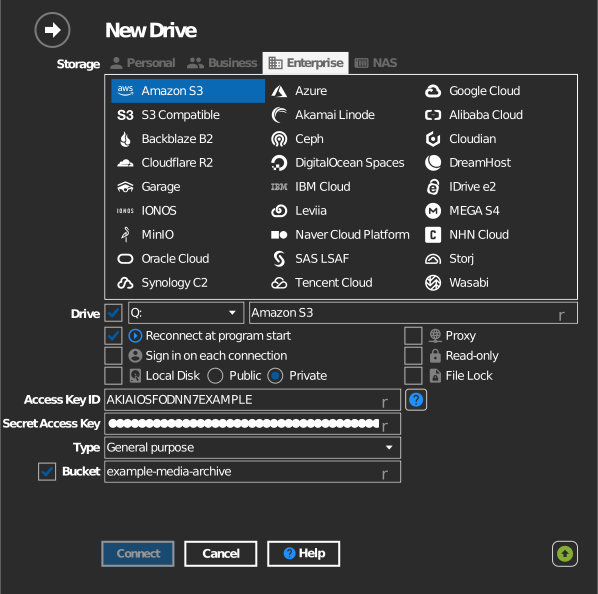
Manual bucket entry
If listing buckets is not permitted for your IAM identity, tick the checkbox to the left of the bucket field and type the bucket name directly.
Settings
| Setting | Description | Default |
|---|---|---|
| Type | General purpose or Directory (S3 Express One Zone) | General purpose |
| Access Key ID / Secret Access Key | IAM credentials | — |
| Bucket | The bucket to mount (list or manual entry) | — |
| Read-only | Blocks writes to the mounted drive | off |
Behavior & limits
- Bucket regions are detected automatically; the drive talks to
s3.<region>.amazonaws.com(directory buckets:s3express-control.<region>.amazonaws.com). - RaiDrive offers directory buckets in
us-east-1,us-east-2,us-west-2,ap-south-1,ap-northeast-1,eu-west-1, andeu-north-1. AWS's current region list for S3 Express One Zone is in AWS: endpoints for directory buckets. - S3 has no real folders — "folders" are key prefixes — see AWS: organizing objects using folders.
- Storage classes with retrieval delay (Glacier and Glacier Deep Archive) cannot be opened until restored — see AWS: restoring archived objects.
Troubleshooting
| Symptom | Cause | Fix |
|---|---|---|
| Bucket list stays empty | IAM identity lacks s3:ListAllMyBuckets |
Use manual bucket entry, or extend the IAM policy |
| Access Denied on connect | Key pair lacks permission on the bucket | Check the bucket policy and the IAM policy |
| Very slow folder rename | Prefix copy-and-delete semantics of S3 | Avoid renaming large folder trees on the drive |