SFTP
Mount an SFTP (SSH file transfer) server as a Windows drive — the most common secure option for NAS devices and Linux servers.
Before you begin
Prepare the following in advance:
- The SFTP/SSH service must be enabled on the server:
- Synology
- QNAP — Telnet/SSH
- ASUSTOR
- The server address and port (22 by default).
- A password, or a private key file, or both — depending on how the server authenticates. One-time codes (2-step verification) are supported.
Help from Synology
Help from QNAP
Help from ASUSTOR
Connect
- Click Add in the toolbar.
- Choose NAS → SFTP.
- Enter the server address, port, username, and password.
- Optionally enter a path to mount a subfolder as the drive root, and pick a charset if the server does not use UTF-8.
- Click Connect.
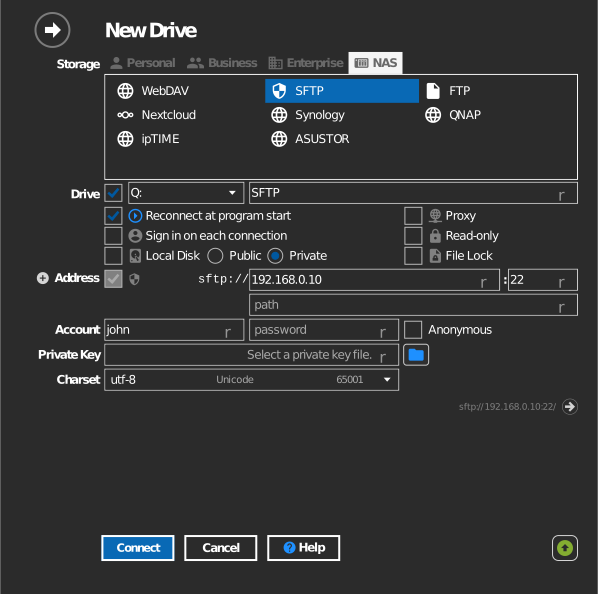
With 2-step verification — after step 5 a prompt appears; enter the verification code and click OK.
With a private key — instead of a password, click the key-file button and
select your private key (PuTTY .ppk or OpenSSH format). If the key has a
passphrase, enter it in the password field.
Settings
| Setting | Description | Default |
|---|---|---|
| Address / Port | Server host and SSH port | port 22 |
| Username / Password | Server account; password may be a key passphrase | — |
| Private Key | Key file used instead of (or with) a password | none |
| Path | Server folder mounted as the drive root | account home |
| Charset | File-name encoding of the server | UTF-8 |
| Read-only | Blocks writes to the mounted drive | off |
Alternate address
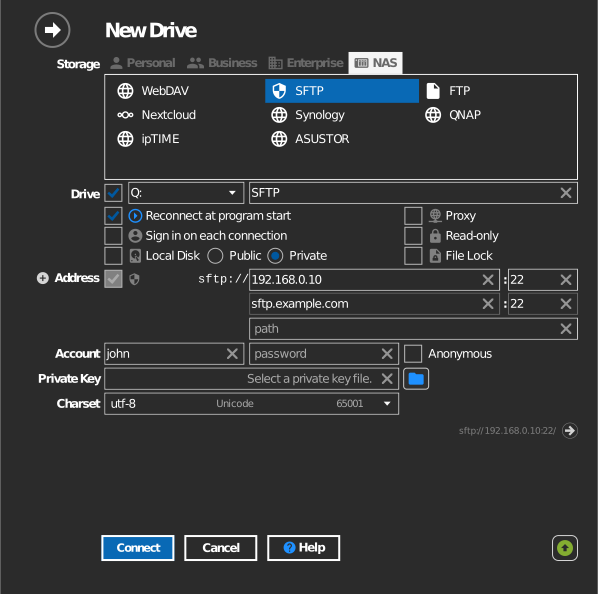
Click the + next to Address to add a second line for a backup server address. The path stays the same as the primary address. If RaiDrive cannot connect with the primary address, it tries the alternate address automatically.
Behavior & limits
- File permissions are the server's Unix permissions — what your account cannot write on the server, it cannot write on the drive.
- Throughput is bounded by the server's SSH encryption performance; low-end NAS CPUs often cap transfer speed well below the network line rate.
Troubleshooting
| Symptom | Cause | Fix |
|---|---|---|
| Auth fails with correct password | Server requires key authentication | Configure a private key, or enable password auth on the server |
| Prompt for verification code every connect | Server enforces 2-step verification | Enter the code; consider an app password if the server offers one |
| Non-ASCII names garbled | Server uses a legacy encoding | Change the charset in the drive's Options |
| Home folder wrong | SFTP root differs from expectation | Set the Path option explicitly |