Google Workspace
Mount the Google Drive of a Google Workspace account as a Windows drive — My Drive, items shared with you, or a shared drive.
Before you begin
Prepare the following in advance:
- A Google Workspace account.
- If your organization restricts third-party apps, ask your Workspace administrator to allow RaiDrive.
For a personal Google account, use the Google Drive entry in the Personal tab instead — see Google Drive.
Help from Google
Connect
- Click Add in the toolbar.
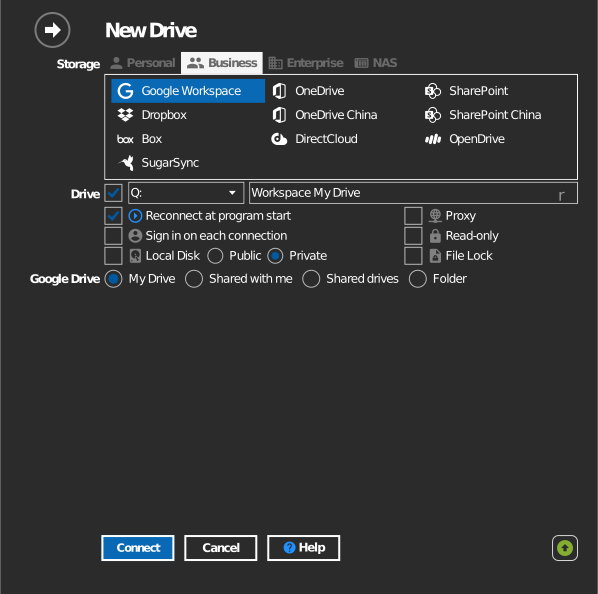
- Choose Business → Google Workspace.
- Pick what to mount:
- My Drive — your own files.
- Shared with me — items other people shared with you.
- Shared drives — a team's shared drive.
- Folder — a single folder (see Mount a specific folder below).
- Set the drive letter and name, then click Connect. Your browser opens — sign in to Google and click Allow.
Mount a specific folder
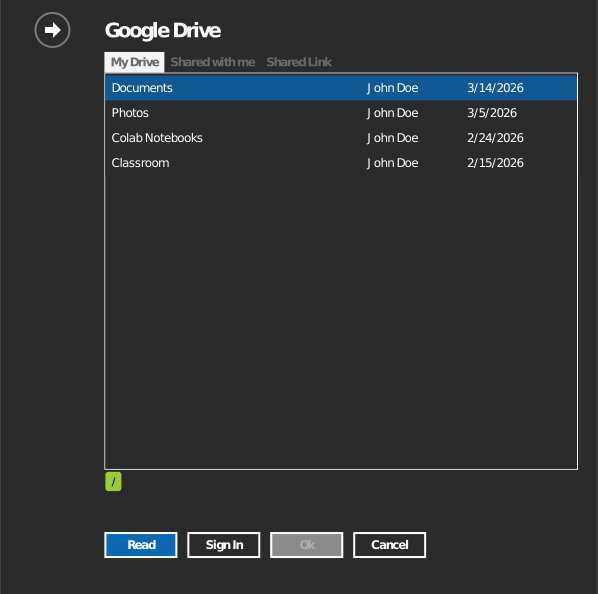
Instead of the whole Drive, you can mount the selected folder.

Specify the folder one of two ways:
- Click the folder icon to open a folder browser — it asks you to sign in first, then double-click into the folder you want and click OK.
- Or select the Shared Link tab and paste the URL directly. Open the folder at drive.google.com and copy the URL from your browser's address bar.
Computer backups aren't browsable in-app — get the folder's URL from drive.google.com/drive/computers instead, and paste it into Shared Link.
Settings
| Setting | Description | Default |
|---|---|---|
| Source | My Drive, Shared with me, Shared drives, or Folder | My Drive |
| Drive letter | Where the drive mounts in Windows | first available |
| Read-only | Blocks writes to the mounted drive | off |
Behavior & limits
- Google Docs, Sheets, and Slides are web-native documents — they appear
on the drive as
.gdoc,.gsheet, and.gslidesfiles that open in the browser rather than as local files. - Files deleted on the drive are moved to Google Drive's Trash, where they can be restored.
- Shared-drive permissions (Viewer/Commenter/Contributor/Manager) are enforced on the mounted drive.
- Heavy parallel transfers may be throttled by Google API quotas.
Troubleshooting
| Symptom | Cause | Fix |
|---|---|---|
| "Access blocked" during sign-in | Workspace admin restricts unapproved apps | Ask the administrator to allow RaiDrive |
| A shared drive is missing | Account is not a member of it | Ask a drive manager to add you, then reconnect |