Export/Import
Move your configured drives to RaiDrive on another PC in one step. The export file, emailed to your account, carries every drive and your settings; credentials go in only if you choose.
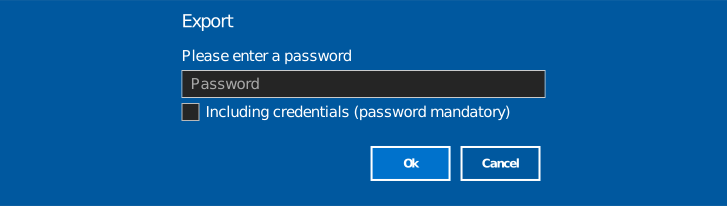
Export
- Open the Account panel and click Export.
- In the dialog, optionally set a password for the file, and choose
whether to check Including credentials:
- Unchecked (default) — storage passwords are stripped from the export; after importing you sign in to each storage again.
- Checked — credentials are included, and a password is mandatory to protect the file.
- Click OK — the export file is emailed to the signed-in account's address, as an attachment.
Didn't get the email?
Check your junk/spam folder if it's not in your inbox.
What's in the file
- Drive list — every setting configured per drive, including mount mode and advanced options. Login info (including the password) is included only when Including credentials is checked.
- Settings — General, Proxy, Cache, and the like.
- Account info (sign-in email, etc.) and Lock settings aren't imported.
Import
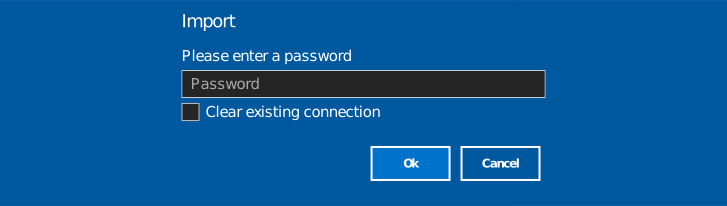
- On the other PC, open the email and download the attached export file.
- In RaiDrive, open the Account panel and click Import.
- Selecting the file opens a dialog. Enter its password, if one
was set, and choose whether to check Clear existing connection:
- Unchecked (default) — the imported drives are added to the current list. A drive that already exists (same kind, name, mount point, and account) is skipped rather than added again.
- Checked — all existing drives on this PC are removed first (connected or not), then the import proceeds.
- Click OK to start the import. Duplicate drives and entries for which no drive letter is available may be skipped. When the import finishes, the results show which entries were imported, skipped, or failed.
Clearing existing connections can't be undone
Checking it removes every drive on this PC, including connected ones, before the import runs. Leave it unchecked if you want to keep any drive already on this PC.
Note
Imported drives arrive disconnected, whether or not credentials were included — click Connect (or Edit) on each drive. Drives exported without credentials then prompt you to complete the storage sign-in.